
Parallelization#
This section describes the different levels of parallelization used by the inversion routines and how to optimize resources. For a given inversion routine, the application decomposes the problem into a series of sub-problems, or tiles, each assigned a mesh and a survey. During the inversion process, the application continuously requests predicted data and derivatives from the sub-problems. The application parallelizes these operations within each sub-problem, as well as externally so that sub-problems can be computed concurrently.
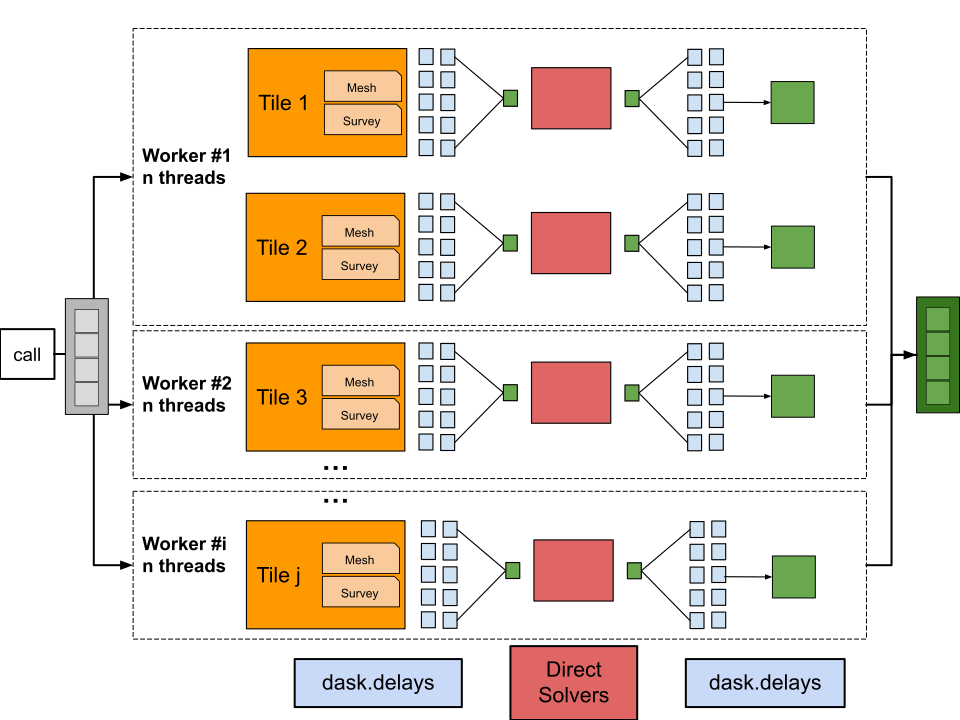
Fig. 15 Schematic representation of the computing elements of a tiled inversion. Each tile receives an assigned mesh and a survey (single-frequency if applicable), with array operations parallelized by dask. The dask operations always bookend the direct solver when employed. Optionally, the workload can be distributed across multiple workers to optimize performance. Each worker is responsible for a sub-set of tiles and with a limited number of threads. Only 1-dimensional arrays are passed between the main process and the workers.#
Dask#
The dask library handles most operations
related to generating arrays. A mixture of dask.arrays and
dask.delayed calls parallelizes the computations across multiple
threads. If a direct solver is involved, the dask operations bookend the
solver to avoid thread-safety issues. The application converts
dask.arrays to numpy arrays before passing them to the direct solvers
and before returning them to the main process. Only 1-dimensional arrays
are returned to the main process, while higher-dimensional arrays and
solvers remain in the distributed memory of the workers.
Sensitivity matrices can optionally be stored on disk using the
zarr library, which is
optimized for parallel read/write access. In this case, the workers
never hold the entire sensitivity matrix in memory, but rather read and
write small chunks of the matrix as needed. This allows for efficient
handling of large sensitivity matrices that may not fit in memory, at
the cost of increased disk I/O. The use of zarr is optional and can be
enabled by setting the store_sensitivity parameter to true in the
ui.json file.
Direct Solvers#
A direct solver is used for any method evaluated by partial differential equation (PDE), such as electromagnetics and electric surveys. The Pardiso and Mumps solvers parallelize operations during the factorization and backward substitution calls. Note that the current implementation of the solvers is not thread-safe and therefore cannot be shared across parallel processes. Any other levels of parallelization need to occur outside the direct solver calls or be encapsulated within a distributed process.
The number of threads used by the solvers can be set by running the command
set OMP_NUM_THREADS=X
before launching the python program. Alternatively, setting
OMP_NUM_THREADS as a local environment variable will set it
permanently. The default value is the number of threads available on the
machine.
Dask.distributed#
It has been found that parallel processes, both for dask.delayed and the
direct solver, tend to saturate on large numbers of threads. Too many
small tasks tend to overwhelm the scheduler at the cost of performance.
This can be alleviated by resorting to the dask.distributed library to
split the computation of tiles across multiple workers. Each worker
can be responsible for a subset of the tiles, and can be configured to
use a limited number of threads to optimize performance. This allows for
better resource utilization and improved performance, especially when
dealing with large problems that require significant computational
resources. The number of workers and threads (per worker) can be set
with the following parameters added to the ui.json file:
{
    ...
    "n_workers": i,
    "n_threads": n,
    "performance_report": true
}
Where n_workers is the number of processes to spawn, and n_threads
is the number of threads to use for each process. Setting
performance_report to true will generate an html performance report
at the end of the inversion, which can be used to identify bottlenecks
and optimize the parallelization settings.
It is good practice to set an even number of threads per worker to optimize the load. Setting too many workers with too few threads can lead to increased overhead from inter-process communication, while setting too few workers with too many threads can lead to saturation of the direct solvers and reduced performance. For example, if the machine has 32 threads available, setting 4 workers with 8 threads each will fully use the resources.
It is also recommended to set the number of workers as a multiple of the number of tiles, to ensure that all workers are utilized. For example, if there are 8 tiles, setting 4 workers will allow each worker to process 2 tiles concurrently. If fewer tiles than workers are available, the program will automatically split surveys into smaller chunks, while preserving the mesh, to ensure even load across the workers. This is less efficient than having a dedicated optimized mesh per tile, but will still provide performance benefits.